Search This Blog

Monday, October 5, 2015

Basic SEO Tips to kick-start traffic!

Businesses are growing more aware of the need to understand and implement at least the basics of search engine optimization (SEO). But if you read a variety of blogs and websites, you’ll quickly see that there’s a lot of uncertainty over what makes up “the basics.” Without access to high-level consulting and without a lot of experience knowing what SEO resources can be trusted, there’s also a lot of misinformation about SEO strategies and tactics.
1. Commit yourself to the process. SEO isn’t a one-time event. Search engine algorithms change regularly, so the tactics that worked last year may not work this year. SEO requires a long-term outlook and commitment.
2. Be patient. SEO isn’t about instant gratification. Results often take months to see, and this is especially true the smaller you are, and the newer you are to doing business online.
3. Ask a lot of questions when hiring an SEO company. It’s your job to know what kind of tactics the company uses. Ask for specifics. Ask if there are any risks involved. Then get online yourself and do your own research—about the company, about the tactics they discussed, and so forth.
4. Become a student of SEO. If you’re taking the do-it-yourself route, you’ll have to become a student of SEO and learn as much as you can. Luckily for you, there are plenty of great web resources (like Search Engine Land) and several terrific books you can read. (Yes, actual printed books!)s
5. Have web analytics in place at the start. You should have clearly defined goals for your SEO efforts, and you’ll need web analytics software in place so you can track what’s working and what’s not.
6. Build a great web site. I’m sure you want to show up on the first page of results. Ask yourself, “Is my site really one of the 10 best sites in the world on this topic?” Be honest. If it’s not, make it better.
7. Include a site map page. Spiders can’t index pages that can’t be crawled. A site map will help spiders find all the important pages on your site, and help the spider understand your site’s hierarchy. This is especially helpful if your site has a hard-to-crawl navigation menu. If your site is large, make several site map pages. Keep each one to less than 100 links. I tell clients 75 is the max to be safe.
8. Make SEO-friendly URLs. Use keywords in your URLs and file names, such asyourdomain.com/red-widgets.html. Don’t overdo it, though. A file with 3+ hyphens tends to look spammy and users may be hesitant to click on it. Related bonus tip: Use hyphens in URLs and file names, not underscores. Hyphens are treated as a “space,” while underscores are not.
9. Do keyword research at the start of the project. If you’re on a tight budget, use the free versions of Keyword Discovery or WordTracker, both of which also have more powerful paid versions. Ignore the numbers these tools show; what’s important is the relative volume of one keyword to another. Another good free tool is Google’s AdWords Keyword Tool, which doesn’t show exact numbers.
10. Open up a PPC account. Whether it’s Google’s AdWords, Microsoft adCenter or something else, this is a great way to get actual search volume for your keywords. Yes, it costs money, but if you have the budget it’s worth the investment. It’s also the solution if you didn’t like the “Be patient” suggestion above and are looking for instant visibility.
11. Use a unique and relevant title and meta description on every page. The page title is the single most important on-page SEO factor. It’s rare to rank highly for a primary term (2-3 words) without that term being part of the page title. The meta description tag won’t help you rank, but it will often appear as the text snippet below your listing, so it should include the relevant keyword(s) and be written so as to encourage searchers to click on your listing. Related bonus tip: You can ignore the Keywords meta tag, as no major search engine today supports it.
12. Write for users first. Google, Yahoo, etc., have pretty powerful bots crawling the web, but to my knowledge these bots have never bought anything online, signed up for a newsletter, or picked up the phone to call about your services. Humans do those things, so write your page copy with humans in mind. Yes, you need keywords in the text, but don’t stuff each page like a Thanksgiving turkey. Keep it readable.
13. Create great, unique content. This is important for everyone, but it’s a particular challenge for online retailers. If you’re selling the same widget that 50 other retailers are selling, and everyone is using the boilerplate descriptions from the manufacturer, this is a great opportunity. Write your own product descriptions, using the keyword research you did earlier (see #9 above) to target actual words searchers use, and make product pages that blow the competition away. Plus, retailer or not, great content is a great way to get inbound links.
14. Use your keywords as anchor text when linking internally. Anchor text helps tells spiders what the linked-to page is about. Links that say “click here” do nothing for your search engine visibility.
15. Build links intelligently. Begin with foundational links like trusted directories. (Yahoo and DMOZ are often cited as examples, but don’t waste time worrying about DMOZ submission. Submit it and forget it.) Seek links from authority sites in your industry. If local search matters to you (more on that coming up), seek links from trusted sites in your geographic area — the Chamber of Commerce, local business directories, etc. Analyze the inbound links to your competitors to find links you can acquire, too. Create great content on a consistent basis and use social media to build awareness and links. (A blog is great for this; see below.)
16. Use press releases wisely. Developing a relationship with media covering your industry or your local region can be a great source of exposure, including getting links from trusted media web sites. Distributing releases online can be an effective link building tactic, and opens the door for exposure in news search sites. Related bonus tip:Only issue a release when you have something newsworthy to report. Don’t waste journalists’ time.
17. Start a blog and participate with other related blogs. Search engines, Google especially, love blogs for the fresh content and highly-structured data. Beyond that, there’s no better way to join the conversations that are already taking place about your industry and/or company. Reading and commenting on other blogs can also increase your exposure and help you acquire new links. Related bonus tip: Put your blog atyourdomain.com/blog so your main domain gets the benefit of any links to your blog posts. If that’s not possible, use blog.yourdomain.com.
18. Use social media marketing wisely. If your business has a visual element, join the appropriate communities on Flickr and post high-quality photos there. If you’re a service-oriented business, use Quora and/or Yahoo Answers to position yourself as an expert in your industry. Any business should also be looking to make use of Twitter andFacebook, as social information and signals from these are being used as part of search engine rankings for Google and Bing. With any social media site you use, the first rule isdon’t spam! Be an active, contributing member of the site. The idea is to interact with potential customers, not annoy them.
19. Take advantage of local search opportunities. Online research for offline buying is a growing trend. Optimize your site to catch local traffic by showing your address and local phone number prominently. Write a detailed Directions/Location page using neighborhoods and landmarks in the page text. Submit your site to the free local listings services that the major search engines offer. Make sure your site is listed in local/social directories such as CitySearch, Yelp, Local.com, etc., and encourage customers to leave reviews of your business on these sites, too.
20. Take advantage of the tools the search engines give you. Sign up for Google Webmaster CentralBing Webmaster Tools and Yahoo Site Explorer to learn more about how the search engines see your site, including how many inbound links they’re aware of.
21. Diversify your traffic sources. Google may bring you 70% of your traffic today, but what if the next big algorithm update hits you hard? What if your Google visibility goes away tomorrow? Newsletters and other subscriber-based content can help you hold on to traffic/customers no matter what the search engines do. In fact, many of the DOs on this list—creating great content, starting a blog, using social media and local search, etc.—will help you grow an audience of loyal prospects and customers that may help you survive the whims of search engines.


Wednesday, February 20, 2013

How To Build Back Links to Blog


Here are 5 Effective Ways to Built organic back links quickly. Apart from writing quality content and promoting it through social media, it’s necessary to have some quality back links to your blog. After the recent search algorithm changes by Google, many blogs are punished for several reasons. To stay safe and ahead of your competitors, it’s necessary to take some action and building organic Back Links will surely help.
This article is written after getting inspired from a video by Matt Cutts, the head of Google SPAM Team. He clearly mentioned some good points on how to build organic back links.

WHAT ARE ORGANIC BACK LINKS ?

There are thousands of ways to build links to your blog and none of them are equal to “Organic Back Links”. In simple words, organic Back Links can be explained as the links that are naturally constructed, which usually happens when you focus on high quality and unique content.

HOW TO BUILT ORGANIC BACK LINKS ?

Here are 5+ sure fire tips that help to built organic Back Links to your blog.
1. Controversies 
Indulging in a Controversy will easily highlight things mostly if you are on the negative side. You need to follow-up regularly and have to be in touch with trending topics. Words have such a great power and believe me, with a single blog post you can grab the attention of the whole media. Play it safe or otherwise you may face some legal issues.
2. Experimanting
Experimenting on things will depend on your interest and passion to achieve something. Not everyone can do experiments as it needs lot of time and patience. So, if you are good at something, then try to experiment on things and publish posts like How-to guides on your blog. This is how unique content can be built and organic Back Links will flow to your article, sometimes for years.
3. Freebies
Using a freebies to get subscribers and Back Links is an old yet powerful strategy. You cannot get backlinks immediately, but over time you can get some quality Back Links. This depends on the quality and type of freebie you are providing. If its a regular one, like a free PSD template or a free theme then there wont be much use. Try to work on creative things and give them away for free.
4. Communities
Lets consider some blogs in the WordPress niche. There are quite popular and useful blogs on WordPress that help to make the most out of your WordPress blog. Whenever they write an article or list out some resources, links to the articles on other blogs will be included. This purely depends on the author of the article and so its necessary to establish some connections with fellow bloggers.
5. Video blogging
Many have the talent to create useful videos yet don’t try it. Consistent exposure can be gained through video blogging and if you need a sort of inspiration to start with, then you can check TheNewBoston (http://thenewboston.org/tutorials.php). That guy got good programming skills and he is sharing some knowledge through his videos. Make videos and your articles will be linked on many blogs.
Bonus tip
Forum Participation also helps to get some backlinks. All you have to do is help others by providing some useful answers for questions in sections you have knowledge on. And important thing is don’t SPAM posts with single word answers, it may result in a ban.
Further upto you
That’s it from my side and if I have missed any important one, let me know through the comments section.

Wednesday, November 7, 2012

Paypal Donate button to Blogger and Wordpress


A great way to reward you for all the hard work and effort you've put into your blog.PayPal Donation button allows readers to easily send money via PayPal.

PayPal Icons


These icons can be used as your donation button if you choose to customize.

Adding a Paypal Donation Button


Sign into your Paypal account and if you don’t have one you can get a free paypal account here.


                    Adding HTML code into Blogspot blog:

All the information you will find on the official Paypal website.


And Adding HTML code into Wordpress blog:
  1. Login into your Wordpress blog and go to its Dashboard
  2. Click Presentation –> Widgets
  3. Click on the content area in front of ‘Text 1’ widget
  4. Paste your HTML code in the content area available and save changes
  5. Open your Wordpress blog and check donate button will be in your blog sidebar

Wordpress Donations Cloud

This paypal widget is quite useful because it's more than just a button. It allows users to link to their own site when they make a donation. Therefore encouraging your readers to make a donation.


I hope you found this article resourceful.....an effort is made to keep it short and to the point....and wish you all the best with your blogging!!!

Tuesday, May 22, 2012

Blog Optimization Tips, TEST your Website (SEO)


                Now-a-days, some really useful tools are available for checking your Website Performance optimization. This helps to load web pages faster with the best optimization techniques. In addition to informing the loading time, some of these tools also offer the ease of comparison to test the performance of your website with your probable competitors. These tools allow you to know the things that are stopping your website to load faster.


                When you are planning to launch a new website or you already have an existing business, you should think about the best performance optimization is vital to improve Web site SEO to get quality traffic. SEO is very useful to make the content of your web pages more relevant, more striking, and more readable by search engines and their ramp. In the process of website optimization, it is very important to check the speed of loading the site. No matter how attractive and unique to your site, or how your content is interesting, no one has time to wait, even for a few seconds to check your site to load or not.


                If it comes to optimizing the website, the first thing that could come in our list is to check the speed of loading of the site which is the time it takes to load your web page. Websites with great responsive web design and content is not quite the thing that matters. In addition, the loading time is important. The download speed site has a huge weight-age in the Google algorithms that decide your ranking. So do not you think it’s a good idea to reduce the loading time of your website!


                Improved speed of your site is important not only for users but also search engine rankings as well. Last April, Google announced that they are now, including the website of speed in their search ranking algorithms.

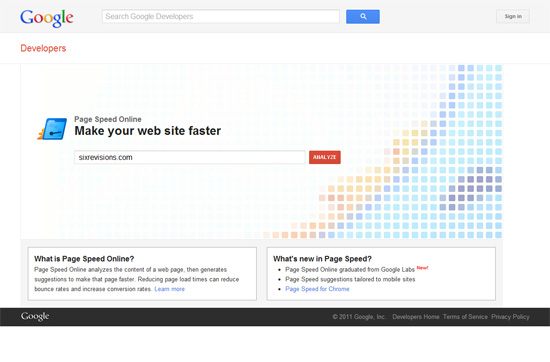
PageSpeed Online  , make your web site faster 

PageSpeed online to analyze the content of a web page and then generates suggestions to make this page more quickly. Reducing page load times may reduce the bounce rate and increase conversion rates


Search Engine Optimization (SEO) – Techniques


SEO is an acronym for “Search Engine Optimization” or “search engine optimizer.” Deciding to hire an SEO is an important decision that can potentially improve your site and save time, but you can also suffer damage to your site and Reputation.


You are newbie to website optimization, or simply new Google Website Optimizer, these videos will help you get all the speed!


The test tool page to help you analyze the loading speed of your websites and learn how to make them faster. It allows you to identify what a web page is fast, slow, too big, what best practices are not followed, and so on. We tried to make it useful to both experts and novices.

Webpagetest ,Test a website’s performance

Run a test speed free website from multiple locations worldwide using real browsers (ie and chrome) and connection speeds of actual consumption. You can run simple tests or testing of technologies, including multi-step transactions, video capture, content blocking, and more. Your results will provide rich diagnostic information, including diagrams of loading resources waterfall, checks speed and page optimization suggestions for improvement.

 Slowcop – Speed up your website

Report of instantaneous speed. Powered by Google Page Speed, it will give you an idea of what your page is slow. The result is often spectacular – a few simple changes can save you hundreds of kilobytes in the size of the page.

Web Page Analyzer – Website Optimization


It’s free website speed test to improve the quality of the site. Enter a URL below to calculate page size, composition and download time. The script calculates the size of individual elements and sums up each type of component web page. Based on these page characteristics the script then offers advice on how to improve the loading time of pages.

Pingbrigade

Ping brigade is a service that allows you to measure and monitor your site statistics. It provide a highly reliable monitoring system can alert you the minute your site goes down to help you restore and avoid costly downtime. Ping Brigade also offers an interactive tool to determine if your site is accessible from anywhere in the world and what kind of latency can expect your users. Finally, there is an open API to allow you to create custom types of monitoring.

Neustar Web Performance

Neustar provides cutting-edge load testing website and site monitoring services for anyone who builds, tests and operates modern sites. It’s innovative features include load testing real browser, Selenium scripts, real AJAX support and more. Coupled with extraordinary customer service, our website and application monitoring services and load testing can be used by everyone to improve and optimize the performance online.

Linkvendor – Website speed check

The site shows speedtester the duration of a given website. This value can be used to show how long a website takes to load and if it is better to optimize the site or change an Internet service provider (slow).


This paper began as an effort to help teams within Google, but we thought it would be equally useful for webmasters who are new to the topic of search engine optimization and want to improve the interaction of their sites with users and search engines.

 Web Site Optimization: 13 Simple Steps Article

This tutorial takes a practical approach for example based on the application of these rules. It is designed for web developers with a small budget, who are most likely using shared hosting, and working under the various restrictions that come with such a configuration.

Web Performance Optimization for WordPress

W3 Total Cache improves the user experience of your site by improving the performance of your server, caching all aspects of your site, which reduces download time and to provide transparent Content Delivery Network (CDN) integration .

 Search Engine Optimization Plugin , Yoast

WordPress SEO is the most complete SEO WordPress plugin that exists today for WordPress.org users. It includes an overview of all features and analysis from page to help you optimize your content pages, images, titles, meta descriptions and more XML sitemaps, and loads of tuning options between two.

Friday, September 10, 2010

Classic FaceBook Widgets


                           Facebook is the largest social networking site with more than 400 million active users and is growing larger every day! Make sure to use these Facebook Widgets to Connect with your large Facebook audience through your Blogger blog or website.

You can use these tools to easily share certain profile information, websites,  blogspot blog, and businesses with the Facebook Community


Create a Facebook profile badge to share selected profile information on your website. A profile badge will allow your users to easily connect with you and add you as a friend.

 
This photo badge allows you to share your Facebook photos on websites and blogs. Choose from a vertical, horizontal, or two-column layout and also choose the number of photos to be displayed.
  

Display your Facebook fan pages for all to see.
Website or Business Widgets
 
Share Button
A powerful facebook widget which allows your visitors to share your content on Facebook!

Fan Box
Lets your users easily become a fan of your site and also allows them to view your Facebook page stream.

Page Badge
Lets you share your Facebook page (one that you have created) information on your website.

Twitter Link
Connect your Facebook page with Twitter. Whenever you update your Facebook fan page your twitter followers will be updated as well with a tweet.


Developers Widgets
 
Publishing to Facebook
This allows your users to publish their content and activity to Facebook.

Comments Box
Lets your users comment on your website content with their Facebook account.

Live Stream
Lets Facebook users to post and share content in real-time


Earn Money with Blogs.


 Do you agree with me that blogs don't make money???

Some of you would say yes. Millions of you would say no (otherwise, why do I see so many advertisements on every other blog?).


Myth about Making Money

The truth is blogs can make money. But, there is no easy way out. Don't get trapped by the word "make money by blogging". Its not as simple as that. When I started off, I wrote a few posts and inserted Bidvertiser ads at all possible locations and waited for people to click. It didn't happen.


On the right path

             It took me nearly a year to realize that it is not easy to make money by blogging. For a while, I started to purely concentrate on my blogging and forget about making money with blogs. This is the period I started to get many backlinks and started to build up my reader base. I got good ranks on Google, Technorati and Alexa. 


             Never write sponsored reviews, unless you are John chow.
This is when I was swayed by sponsored reviews. I started to make some good money by writing sponsored reviews. There were lot of offers as my blog had a good ranking. I realized that Google Page Rank is the king here. Even though everyone tries to play down Google's ranking system, they certainly have the say in your blog's success. 


            How to make money?

             So, here's my advice to newcomers (who has an intention to make money by blogging):
Start off with a good and interesting topic to write about. It can be on car buying, advice on bikes, gardening, diabetes care or even on a celebrity. But, ensure that you write about the topic consistently. No point in writing about everything under the world.


Get your blog indexed by Google. Find out how you can get indexed and rank #1 in Google


Get backlinks from blogs with similar content/ from your own niche. 

Once you have few posts, include Google Bidvertiser advertisements.


If you are going to use Bidvertiser, do not join in any traffic building networks. It doesn't help. These networks will increase your traffic, but will reduce your Click Through Rate (CTR) and eventually your earnings per click.


      Concentrate on specific keywords and improve on your Search Engine Page Ranking


              If you are making money already, then it's fine. If not, try to change the location of your ads or change the colour of your links. Experiment and see whether you have any improvement in the clicks


              If you still don't get clicks and your CTR lies below 2% mark, it's time to consider other modes of advertising.


             Sponsored reviews are good for short term benefits. Do not use them if you have an intention to stay in the blogging world for a longer period


I have touched on few controversial issues above and certainly there will be views that are for and against them. Feel free to share your views.

Sunday, October 4, 2009

Change Size of Blogger Comment form

How To Change The Width And Height Of Comment form in blogger.As you would have seen some using wide comment form and some using small comment from.As there are no much options in blogger to make changes in the blogger comments form but still there are some alterations like we can make,to alter its width and height.As blogger comment system is not one of the best comment system and blogger team need great modifications to be done in it to make it better and useful for readers.

Some comment system hacks you can use like are highlight blog author comments and numbering of blogger comments.


Now lets continue on our tutorial on how to change the width of comment form.Just GO To Blogger Layout >> Edit/Html >> Expand Widgets >> Press Ctrl+ F >> Search For Below Codes.
<iframe allowtransparency='true' class='blogger-iframe-colorize' frameborder='0' height='275' id='comment-editor' scrolling='auto' src='' width='100%'/>

Now edit the value of codes in red that is width and height of blogger comment form.Just increase or decrease the values of width and height properties to make it alter.I am sure you will be going to love this tutorial.Best of luck!!

Wednesday, September 23, 2009

Celeb Blogs


This is a collection of some of the celebs who blog. Do check this list to find out if your favorite celeb blogs or not. If you feel that I have not included some celebrity blogger in this list then please give the name and blog link of that celeb in the comments section. This post will be updated regularly depending on the entries that I get. I would also like to mention that some of the celebrity blogs may or may not be active.


Monday, August 24, 2009

Cool Bookmark Buttons

Hand Drawn Social Bookmarking Icon Sets

Hi friends this is a collection of 12 beautiful hand drawn Social Bookmarking Icon sets for your Blog or Website. Enjoy this cool collection of icons and don't forget to give your valuable comments .


FreeHand ColorStroked icon pac

Color Stroked Free Hand Icon Set By mfayaz

Hand Drawn Social Bookmarking Icon Sets


Black Magic Marker Social Bookmarking Icons

108 free high resolution Simple Black Magic Marker Social Bookmarking Icons By My Site My Way

Hand Drawn Social Bookmarking Icon Sets


Free Hand Drawn Doodle Icon Set for Bloggers

Set of free hand drawn doodle icons by Spoon Graphics

Hand Drawn Social Bookmarking Icon Sets


Handy Icons

24 free and exclusive vector icons by Web Designer Depot

Hand Drawn Social Bookmarking Icon Sets


Handycons: a free, hand drawn social media icon set

Free, hand drawn social media icon set containing 12 icons by Janko At Warp Speed

Hand Drawn Social Bookmarking Icon Sets


Handycons 2 - another free hand drawn icon set

Icon set containing 20 more hand drawn icons by Janko At Warp Speed

Hand Drawn Social Bookmarking Icon Sets


Social media icons

Hand made social media icons by plechi

Hand Drawn Social Bookmarking Icon Sets


Social Icons hand drawned

Hand drawn social media icons by TheG-Force

Hand Drawn Social Bookmarking Icon Sets


Free Social Networking Hand Drawn Photoshop Shapes

Set of Hand Drawn Social Networking Photoshop Shapes by My Site My Way

Hand Drawn Social Bookmarking Icon Sets


Sketch’d Up Vector Icon Set

Over 100 hand drawn icons in vector format designed by Oliver Twardowski

Hand Drawn Social Bookmarking Icon Sets


20 free Web 2.0 icons (colored pencil version)

Hand drawn Web 2.0 icons by Icon Expo

Hand Drawn Social Bookmarking Icon Sets


19 Free hand-drawn sketch icons

Hand-drawn sketch icons by Charfish Design

Hand Drawn Social Bookmarking Icon Sets
please social bookmark if you liked

Sunday, August 23, 2009

Change Blogger Favicon

This Blog post will explain how to add favicon for your Blog
The main advantage of creating and using favicon is ,it makes it easy to find your blog or site when someone favourited or bookmarked your site/blog among several other sites.


So,ready to create a favicon for your Blog!

favicon
All you need is a program to create a favicon in (.ico) format.If you haven't a program to create in .ico format,
No Problem....you can also use png or gif format.If you have Photoshop, or any other programs like that,open it and create a 16*16 image and save it as .png or gif format [look at the below screenshot below]

save the image in png format
Or there are so many online sites which can create a Favicon for you,just google 'free online 16*16 icon generator' .They ask you to upload a picture from your desktop,and they convert it into 16*16 .ico file.

You are just a few steps away from creating a beautiful Favicon for your site....

go to your blog dashboard>Layout>Edit Html


and look for this code


add the following code right after it

<link href='http://www.textmarks.com/images/WidgetAlphaIcon-B.gif' rel='shortcut icon'/>
<link href='http://www.textmarks.com/images/WidgetAlphaIcon-B.gif' rel='icon'/>

replace the 'icon file url' ie http://www.textmarks.com/images/WidgetAlphaIcon-B.gif both the times with the url of your icon.

Any .gif .jpg image would do; search google for favicon .ico

That's it! Now you can see a beautiful favicon in your blog.

Feel free to add the comments..... and if it works share it!